Showing posts with label Blogger. Show all posts

Monday, June 10, 2019

How To Make Syntax Highlighter

Have you ever found it difficult to insert code in your blog article? If so, you need the one called  syntax Highlighter

What is the Syntax highlighter?

How To Make Syntax Highlighter On Blogger

The Highlight Syntax is a kind of plugin that contains program code to make it easier to insert coding on blogger articles or other platforms.

Usually people who use syntax highlighter are people who are familiar with programming code because programming code is their daily food

But for those of you who are just learning programming code, don't worry, because this tutorial is easy for beginners to do

Here's the tutorial from Creating Highlight Syntax to bloggers.

Install Syntax highlighter CDN

First, please enter your blogger and enter the Menu >> Edit HTML

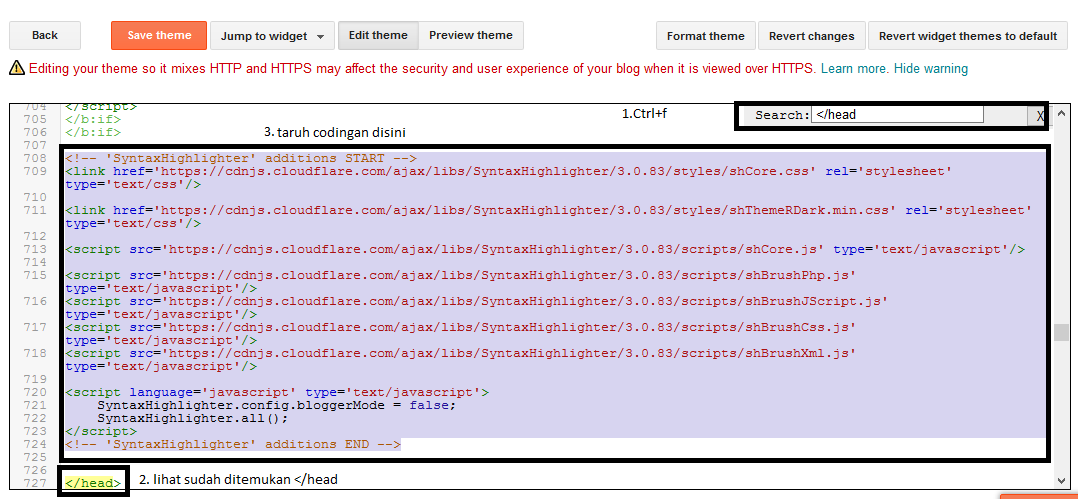
After that search for </ head> using ctrl + f and put the code below, on above </ head>
How To Make Syntax Highlighter On Blogger


<!-- 'SyntaxHighlighter' additions START -->
<link href='https://cdnjs.cloudflare.com/ajax/libs/SyntaxHighlighter/3.0.83/styles/shCore.css' rel='stylesheet' type='text/css'/>

<link href='https://cdnjs.cloudflare.com/ajax/libs/SyntaxHighlighter/3.0.83/styles/shThemeRDark.min.css' rel='stylesheet' type='text/css'/>

<script src='https://cdnjs.cloudflare.com/ajax/libs/SyntaxHighlighter/3.0.83/scripts/shCore.js' type='text/javascript'/>

<script src='https://cdnjs.cloudflare.com/ajax/libs/SyntaxHighlighter/3.0.83/scripts/shBrushPhp.js' type='text/javascript'/>
<script src='https://cdnjs.cloudflare.com/ajax/libs/SyntaxHighlighter/3.0.83/scripts/shBrushJScript.js' type='text/javascript'/>
<script src='https://cdnjs.cloudflare.com/ajax/libs/SyntaxHighlighter/3.0.83/scripts/shBrushCss.js' type='text/javascript'/>
<script src='https://cdnjs.cloudflare.com/ajax/libs/SyntaxHighlighter/3.0.83/scripts/shBrushXml.js' type='text/javascript'/>

<script language='javascript' type='text/javascript'>
    SyntaxHighlighter.config.bloggerMode = false;
    SyntaxHighlighter.all();
</script>
<!-- 'SyntaxHighlighter' additions END -->

How To Use Syntax Highlighter


Create a article and put the code below in html

How To Make Syntax Highlighter On Blogger


<pre class="brush: php">
code contains
</pre>

That's how to make a highlighter syntax, thank you

Reference: Motivasi Done

Saturday, November 25, 2017

How to create easy an automated Sitemap in blogger

How to create easy an automated Sitemap in blogger-Creating a sitemap on bloggers will make it easier for blog visitors to find the articles they want,In addition with the sitemap, blog will look more professional and more presentable.

This is an example of an easy-to-create sitemap and make your blog more professional
How to create an automated Sitemap in blogger
If you want to create a sitemap as above then follow the step by step below

1.Pages>>New Pages
2.Click HTML in beside compose
3.Copy this is script and paste in your html pages
<div id="bp_toc">
Loading Sitemap. Please wait....</div>
<script src="https://cdn.rawgit.com/Arlina-Design/redvision/master/daftar-isi-simple.js" type="text/javascript"></script> <script src="/feeds/posts/summary?alt=json-in-script&amp;max-results=9999&amp;callback=loadtoc" type="text/javascript"></script>
<style scoped="" type="text/css">
#comments,#Label1,#FollowByEmail1 {display:none;}
#HTML3 {visibility:hidden;}
/* CSS Full Sitemap */
#bp_toc {background:#8B0000;color:#666;margin:0 auto;padding:5px;}
span.toc-note {padding:20px;margin:0 auto;display:block;text-align:center;color:#ffcfcc;font-weight:700;text-transform:uppercase;font-size:30px;line-height:normal;}
.toc-header-col1 {padding:10px;background-color:#f5f5f5;width:250px;}
.toc-header-col2 {padding:10px;background-color:#f5f5f5;width:75px;}
.toc-header-col3 {padding:10px;background-color:#f5f5f5;width:125px;}
.toc-header-col1 a:link, .toc-header-col1 a:visited, .toc-header-col2 a:link, .toc-header-col2 a:visited, .toc-header-col3 a:link, .toc-header-col3 a:visited {font-size:13px;
text-decoration:none;color:#aaa;font-family:&#39;Roboto&#39;;font-weight:700;letter-spacing: 0.5px;}
.toc-header-col1 a:hover, .toc-header-col2 a:hover, .toc-header-col3 a:hover {
text-decoration:none;}
.toc-entry-col1, .toc-entry-col2, .toc-entry-col3 {background:#fdfdfd;padding:5px;padding-left:5px;font-size:89%}
.toc-entry-col1 a, .toc-entry-col2 a, .toc-entry-col3 a{color:#666;font-size:13px;}
.toc-entry-col1 a:hover, .toc-entry-col2 a:hover, .toc-entry-col3 a:hover{color:#cdb280;}
#bp_toc table {width:100%;margin:0 auto;counter-reset:rowNumber;}
.toc-entry-col1 {counter-increment:rowNumber;}
#bp_toc table tr td.toc-entry-col1:first-child::before {content: counter(rowNumber);min-width:1em;margin-right:0.5em;}
td.toc-entry-col2 {background:#fafafa;}
#bp_toc a{text-align:left;float:none;font-size:90%;padding:0}
</style>
How to create an automated Sitemap in blogger
4.Click Save and you can see the result

That is How to create an automated Sitemap in blogger ,if you want change background color so you can change in Background-color

How To Add Post Views Counter To Blogger

How To Add Post Views Counter To Blogger- I've been looking for some articles about adding post views to bloggers and I find an easy way to do it. Example of the view counter on the blog as below or on the blog that I use this
Counter view is to display the number of views on articles. And counter view certainly has the benefit of making visitors know which articles are most viewed so they know that the article is really useful.

The following step by step in creating a view counter on blogger:

1.Go To HTML>>Template>>Edit HTML
2.Find .showAuthor in html or you can find it with CTRL+F and write . .showAuthor


3.paste the script above all .ShowAuthor as shown below
<a expr:name='data:post.id'/> <i class='fa fa-eye'/> <span id='postviews'/> Views
First .ShowAuthor


Second .ShowAuthor

Third .ShowAuthor
4.Paste This Script above </Body> in your html as shown below
<script src='https://cdn.firebase.com/v0/firebase.js' type='text/javascript'></script>
<script>
$.each($("a[name]"), function(i, e) {
var elem = $(e).parent().find("#postviews");
var blogStats = new Firebase("https://YOUR-APP-NAME.firebaseio.com/pages/id/" + $(e).attr("name"));
blogStats.once("value", function(snapshot) {
var data = snapshot.val();
var isnew = false;
if(data == null) {
data= {};
data.value = 0;
data.url = window.location.href;
data.id = $(e).attr("name");
isnew = true;
}
elem.text(data.value);
data.value++;
if(window.location.pathname!="/")
{
if(isnew)
blogStats.set(data);
else
blogStats.child("value").set(data.value);
}
});
});
</script>

5.Save the script and then you can see the result

This is demo of post views Counter

Demo


Reference:mybloggeraide